
If you’re a PC nerd like me. You need to know as much as you can about any piece of computer tech to make an informed choice. I will do my best to explain the motherboard size options so you can pick the best motherboard for your PC build.
First, the size of your motherboard, mainboard or mobo size, as some folks call it, is important.
It determines what your PC supports overall in terms of components and features. If it’s too small, you might have to sacrifice some features; if it’s too big, it won’t fit in your computer case.
So, let’s look at the different motherboard sizes and find your perfect fit among the popular motherboard form factors.
Key Takeaways:
Here is what you can expect to learn after reading this article on motherboard sizes.
- What motherboard sizes are available
- Which motherboard form factors are most common
- Features and limitations between the different form factors
- What to consider before choosing a motherboard size
Our goal is to help you find the best balance between motherboard features, performance and price.
Introduction to Motherboard Form Factor
When planning a PC build, one of the first items on your PC build checklist is the motherboard form factor you need.
However, some motherboard manufacturers play fast and loose with these form factors, especially with the E-ATX standard.
You’ll often see motherboards measuring as little as 10.1 inches wide, a size known as E-ATX. I guess they figure it’s okay as long as it’s over 10 inches.
 The term form factor applies to many things when determining a standard for physical dimensions, such as PC power supply types or, in the case of a motherboard, the size and mounting hole locations for installation in a computer case.
For PC compatibility, standard form factors are necessary to make sure that the parts from different vendors and generations can all work together seamlessly.
This standardization means you can mix and match cases and motherboards, knowing they’ll fit together.
In this article, we’ll explore the most common motherboard form factors, their best use cases, and the pros and cons of each.
The Different Motherboard Types and Their Best Uses
Here are the most common motherboard form factors, ranked by popularity: ATX is the most common, and XL-ATX is for the hardcore enthusiast with an unlimited budget!
- ATX: This is the most common motherboard used in desktop computers, measuring 12 x 9.6 in (305 x 244 mm). The ATX motherboard form factor offers a well-balanced option for most PC builds. They feature plenty of expansion slots and are well-suited for gaming systems, workstations, or any use that requires a full set of features without excessive size.
- E-ATX (Extended ATX): These motherboards are designed for high-performance setups and can measure up to 12 x 13 in (305 x 330 mm). However, some manufacturers consider widths as low as 10.1 in (257 mm) in this category. With additional slots and enhanced features, E-ATX boards are best for users who need top-tier performance and substantial hardware configurations, such as video editing or server applications.
- Micro-ATX: Slightly larger than Mini-ITX, Micro-ATX motherboards measure 9.6 x 9.6 in (244 x 244 mm) and offer more expansion slots and features, while still being the primary choice for smaller cases. They balance size and functionality well, making them popular for budget gaming builds or office computers.
- Mini-ITX: Perfect for small-form-factor builds, Mini-ITX motherboards measure just 6.7 x 6.7 in (170 x 170 mm) and are ideal for users who need a compact, portable system without sacrificing essential features. They are great for minimalist setups, such as DIY NAS units or entertainment center PCs.
- XL-ATX: Wrapping up the largest of the bunch, XL-ATX boards are huge, measuring 13.6 x 10.4 in (345 x 264 mm), give or take a few mm depending on the manufacturer. This motherboard form-factor is targeted at enthusiasts looking for extreme customization options and who have the space to accommodate these massive setups. They’re perfect for multi-GPU configurations and advanced cooling systems, making them the ultimate choice for a high-end gaming rig or a professional workstation.
ATX Motherboards: The Gold Standard
 Let’s start with the standard ATX motherboard form factor, the classic choice in this motherboard size guide. It’s the favorite go-to for many PC builders.
The ATX size comparison chart shown above positions this form factor as the perfect middle ground, offering plenty of room for expansion cards, RAM slots, and all the most common PC motherboard connections you’ll need. This makes it the most common motherboard found in most desktop computers.
This might be your best option if you’re looking for a balance between size and functionality.
Pros and Cons of Using an ATX Motherboard
Pros:
- Expandability: Typically includes four (4) slots for RAM, multiple PCI Express (PCIe) slots, and numerous USB ports. ATX motherboards offer plenty of room to expand your PC.
- Cooling Options: Plenty of space for larger heatsinks and more case fans can improve overall system cooling when properly configured.
- Versatility: Supports a wide range of components and configurations, making it ideal for gaming setups and heavy-duty workstations.
- Availability: As the most popular size, it is available in a large selection across various price ranges and with different features.
Cons:
- Size: Its larger footprint might not fit in smaller computer cases, limiting your case design choices.
- Cost: Typically more expensive than smaller motherboard sizes, which might exceed some users’ budgets.
- Overkill for Simple Builds: If you only need a basic setup and don’t plan to upgrade, the extensive features of an ATX motherboard might be unnecessary.
Extended ATX (EATX): For the Ambitious
 Need a bit more motherboard? The Extended ATX (EATX) is here for those who need it.
Extended ATX provides more slots and features, but make sure your PC case is large enough to fit its larger dimensions.
This motherboard is a good choice if you need more space for components or the option to add or upgrade expansion cards later.
Pros and Cons of Using an EATX Motherboard
Pros:
- Increased Expansion Slots: With more room for GPUs and expansion cards, EATX motherboards are ideal for users building powerful graphics workstations, or high-end AI/LLM or 3D rendering setups.
- Enhanced Power Delivery: Typically features more robust power phases (VRM), which are ideal for overclocking and supporting demanding CPUs.
- Superior Cooling Options: The additional space allows for better airflow and larger cooling solutions, helping keep components cooler under heavy workloads.
Cons:
- Bulk and Size: EATX motherboards are notably larger than standard ATX boards and require larger cases, which can limit where they fit in your space.
- Higher Cost: They come with a premium price, which may not be justified if you don’t need the extra expansion slots and features.
- Complex Installation: The larger size and additional features can complicate the PC build process if you’ve chosen a case that’s too small. Understanding advanced motherboard connections and configuration is required to take full advantage of it.
Micro ATX (mATX): Compact and Capable
 If you prefer a more compact setup, consider the Micro ATX motherboard. It’s the next smaller option in this motherboard size comparison chart, sacrificing a bit of expansion for a smaller footprint.
This motherboard is a good choice if you’re looking for a smaller-footprint case without sacrificing too much expansion or functionality. And while it may be smaller than the standard ATX form factor, an mATX-based gaming rig is worth considering.
If this describes you, a mATX motherboard is your perfect option for everyday tasks and standard gaming.
Pros and Cons of Using a Micro ATX Motherboard
Pros:
- Compact Size: With its smaller dimensions, a Micro ATX motherboard is ideal for builds where space is at a premium, making it a perfect fit for small-form-factor cases.
- Cost-Effective: Typically more affordable than larger motherboards, mATX is a great choice for budget-conscious users who still want a decent array of features.
Cons:
- Limited Expansion Options: Fewer expansion slots may restrict future upgrading potential for enthusiasts and high-demand users, and limit support for only one (1) GPU and maybe one other small add-on card.
- Cooling Constraints: The compact size might limit cooling options when installed in a smaller PC case, potentially impacting performance under heavy workloads.
- Reduced Power Phases: Less robust power delivery compared to larger motherboards may affect overclocking capabilities and support for high-end CPUs.
Mini-ITX: Tiny but Mighty
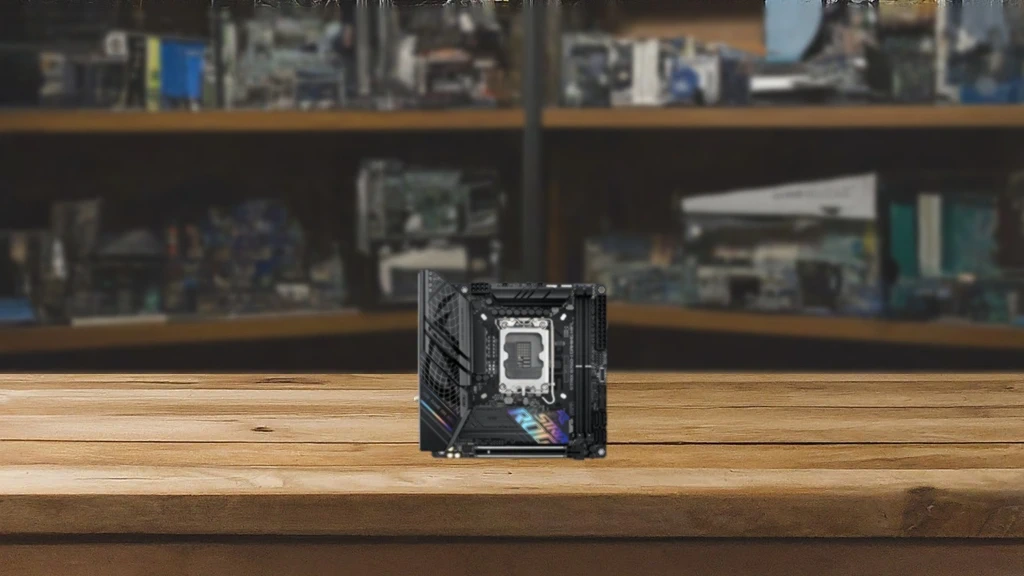 Then there are the Mini-ITX motherboards, where space is limited. This small yet practical motherboard is your best choice for space-saving PC builds that prioritize low power consumption.
Expansion slots will be minimal, with only the basics, such as adding a couple of RAM sticks and a GPU.
However, if you need a small, specialized PC, such as a DIY NAS or Media Center server, this is the motherboard to consider.
Pros and Cons of Using a Mini-ITX Motherboard
Pros:
- Ultra Compact Size: The Mini-ITX motherboard takes compactness to the next level, fitting into the tiniest spaces. It’s perfect for those who want a sleek, minimalistic build or need to fit their PC in a tight space.
- Portability: Thanks to its small size, a Mini-ITX system is easy to transport, making it an excellent choice for LAN parties or for users who frequently move their PCs.
- Energy Efficiency: Generally, these motherboards consume less power than their larger counterparts, which can benefit energy efficiency, especially in always-on applications like a home media server or NAS.
Cons:
- Limited Expandability: With only one PCIe slot and fewer memory slots (RAM), upgrading a Mini-ITX system for storage and graphics is often not an option.
- Potential for Heat Issues: Less space means fewer options for mounting fans or larger cooling solutions in a small PC case, which can lead to overheating if not configured properly.
- Higher Cost per Feature: This compact design can sometimes come at a higher cost per supported feature, as manufacturers have to pack more into a smaller footprint.
Quick Tip: If a Mini-ITX motherboard isn’t small enough, consider Nano-ITX, another small form-factor motherboard measuring just 4.7 x 4.7 in (12cm x 12cm) and known for its full integration and low power consumption. Any smaller and you’ll need a magnifying glass to install it!
XL-ATX: Because Bigger is Sometimes Better
 If you want to see just how many GPUs you can fit into a single PC, the XL-ATX motherboard is for you.
The XL-ATX is a monster motherboard with room for days and is perfect for serious gaming or as a rendering setup for serious content creators.
Just remember, you’ll need an extra-large PC case that can handle this beast. Where size matters, this is the motherboard for you.
Pros and Cons of the XL-ATX Motherboard
Pros:
- Plenty of Expansion Slots: The XL-ATX allows for multiple GPUs and additional PCIe cards, making it ideal for enthusiasts who demand extensive hardware configurations.
- Enhanced Cooling Options: Its larger size allows it to accommodate advanced cooling systems, helping maintain optimal temperatures even during intense use.
- Optimized Performance: Designed for power users, including gamers and content creators, it supports high-performance CPUs and offers a generous number of RAM slots for maximum performance.
Cons:
- Bulky Size: As the name suggests, the XL-ATX requires a larger case, which may not be convenient for all setups, especially those with limited space.
- Higher Cost: This motherboard often comes with a hefty price tag due to its advanced features and larger size.
- Complex Installation: Its size and complexity can lead to installation challenges. Careful consideration should be given to selecting cases, power supplies, and other components that can support this motherboard.
Motherboard Size and Performance Considerations
The size of your motherboard can significantly impact your PC’s performance. Larger motherboards, such as ATX, offer more features and expansion options, enhancing your system’s capabilities.
For example, ATX motherboard layouts typically include four (4) RAM slots and expansion slots for adding more memory or other components.
However, these larger motherboards also require a larger PC case, which can make your PC bulkier and heavier.
On the other hand, smaller motherboards like Mini-ITX may have limited features. Still, they offer better power efficiency and generate less heat, making them best suited for compact, energy-efficient builds.
Motherboard Size and Compatibility
Choosing the right motherboard size is also about compatibility with other PC components. Larger motherboards, such as ATX, often require larger cases, which can limit your options if you’re aiming for a compact build.
Alternatively, smaller motherboards like Mini-ITX work best in cases designed for small-form-factor PCs.
Additionally, some motherboards have specific requirements for power supplies and cooling systems.
For example, a high-performance ATX motherboard might need a more powerful PSU and advanced cooling solutions when paired with a high-end GPU. At the same time, a Mini-ITX board might only require a smaller, less powerful PSU, since your GPU options are limited by space and cooling constraints.
Knowing this will help you choose the best PC components for your PC build.
So, What Size Motherboard Do You Need?
When choosing a motherboard size, consider your specific needs. Do you want a powerful gaming rig or a sleek, compact office PC?
For example, if you’re building a gaming PC, consider factors like the number of memory slots and whether the RAM you’re using will fit without interfering with the CPU Cooler. Also, does it support my GPU? They are larger and heavier than ever before!
Each motherboard size has its strengths and weaknesses, so consider the options we mentioned above and pick the one that fits your needs and space.
What is a VRM?
We mentioned VRMs and power delivery earlier in this article. Here’s what that means and why it’s important when choosing a motherboard.
VRM stands for voltage regulator module, which includes components like MOSFETs, chokes, and capacitors. I hear you asking…what the heck is a choke?
Without boring you with the techno-babble, these components are crucial for channeling power from the motherboard to other system components.
Basically, it boils down to this: the more power stages your motherboard’s VRM supports, the better its power delivery will be.
While I may get flamed in the comments below, here is a simple way to look at it. Most motherboard manufacturers will market their boards for gaming or general purposes.
However, if you’re unsure about a specific motherboard you’re considering, a quick online review will usually answer whether it’s a good choice for your PC build.
Okay, for you geeks like me, here’s a good place to start if you have to know all the nerdy details about VRMs.
Questions Readers Often Ask
Can I install a small motherboard like a Mini-ITX into a large Full-Tower case?
Yes, you can. Most PC cases are designed to be “backward compatible” with smaller motherboard form factors. Since the mounting hole patterns for Mini-ITX and Micro-ATX are typically subsets of the standard ATX layout, a larger case will usually have the necessary standoff positions to secure a smaller board. However, it may look a bit sparse inside, and you might need to check if your cable lengths reach the headers on the smaller board.
Does the motherboard size affect my CPU speed or the frame rate in games?
No. A CPU will run at its rated clock speed regardless of whether it’s on a Mini-ITX or an E-ATX board. However, smaller boards often have fewer power phases (VRMs) and less surface area for heat dissipation. This means that if you are using a high-end processor, a smaller board might cause the CPU to “thermal throttle” (slow down to stay cool) sooner than a larger board with more robust cooling and power delivery would.
Are the mounting screws and standoffs different for each form factor?
No, the screws and standoffs themselves are standardized. Whether you are building an XL-ATX behemoth or a tiny Mini-ITX system, you will almost certainly use standard #6-32 or M3 screws. The only thing that changes between form factors is the physical arrangement (the pattern) of where those standoffs are placed on the case tray.
Do smaller motherboards have built-in Wi-Fi more often than larger ones?
Actually, yes. Because Mini-ITX boards only have a single PCIe slot (which is almost always used for a graphics card), users don’t have the option to add a dedicated Wi-Fi expansion card later. To compensate for this lack of expandability, manufacturers “integrate” Wi-Fi and Bluetooth onto the board more frequently than they do with budget-friendly ATX or Micro-ATX boards.
If I choose a smaller board, will I lose out on storage capacity?
Potentially. While motherboard size doesn’t limit the size of the storage device you can use, it does limit the number of connection ports. Smaller boards (Micro-ATX and Mini-ITX) typically have fewer SATA ports for traditional hard drives and fewer M.2 slots for high-speed NVMe SSDs compared to ATX or E-ATX boards. If you plan on running a massive storage array with five or six different drives, a larger form factor is usually a safer bet.
Final Thoughts
Understanding the different motherboard form factors is important before you build or upgrade your PC, as each has its own features, advantages, and trade-offs.
Armed with a better understanding of motherboard sizes, it’s time to make an informed decision.
Remember, always consider your needs now and what you might need later. Will you be able to upgrade later, or will you need an entirely new system?
Planning ahead can often save you money in the long run. However, if you’re like me, you love repurposing old PCs and building new ones.
I have eight (8) PCs to prove it!



Really helpful breakdown of motherboard sizes! I’m building my first PC and trying to figure out which size I should use. The pros and cons between ATX, microATX, and mini-ITX was very helpful!
I’m glad it was helpful! I always approach my builds with the case size I want to use. I’m into sim racing and flight sims, so for my sim rigs, I used full-size towers so I can set gear on top of them like my Butt Kicker Amp. 🙂 For my everyday office work PC, I went small with an ITX motherboard so it would take up less space on my desk.
If I plan to overclock my CPU, does the VRM matter or will most be able to handle it?
Yes, the VRM definitely matters! If you’re building using a CPU like an Intel i9-13900k or 14900k, you’ll want a motherboard with a robust VRM. Meaning you’ll want to look at the “Z” series boards.
Also, be sure the motherboard you buy supports overclocking in the BIOS. Just because it supports a CPU you can overclock, doesn’t mean you can in the BIOS doesn’t provide the overclock settings.
Alway check the motherboards manual, but if you buy an “Z” series board, you’ll likely be fine.
I’m letting my son build a PC for me and he says I should use a standard ATX motherboard even though it’s just going to be an office PC. I really want a smaller system that doesn’t take up too much room on my desk. It this the best option?
Although I’m not sure why he wants to use an ATX-sized motherboard, it may be that it’s just easier to build a system in a full-sized case than in a small or mid-sized tower. Either way, while an ATX build is larger, you will have more room for upgrades if you’re not planning to install a Graphics Card (GPU). Just a side note, if your son says you “Need” a GPU, he may be hoping you’ll let him play some games on it when you’re off work. 🙂
I never knew there was an XL-ATX sized motherboard. I guess that would be needed if you’re building the OG graphics workstation!
They’re definitely not mainstream. I would guess, as you said, mostly for large rendering stations or even today for someone wanting to run a large local AI LLM. It would certainly be an expensive solution, especially with today’s RAM costs!
Nice comparison! Isn’t there a Motherboard even smaller that a Mini-ITX?
Perfect timing! I was replying to comments when you left this one. You are absolutely right! There are a few smaller motherboards like Mini-STX and Nano-ITX. I didn’t include them as they are either limited in expansion or mostly for specialized applications. Mini-ITX is the smallest form factor for consumer DIY builds.
I didn’t know there were so many choices until I started shopping around and watching reviews. I went with a standard ATX for my first build just to be safe since I’m sure there are many things to consider along the way. I didn’t want any surprises since the Micro Center near me is almost 2 hour away and I didn’t want to have to make any returns. LOL!