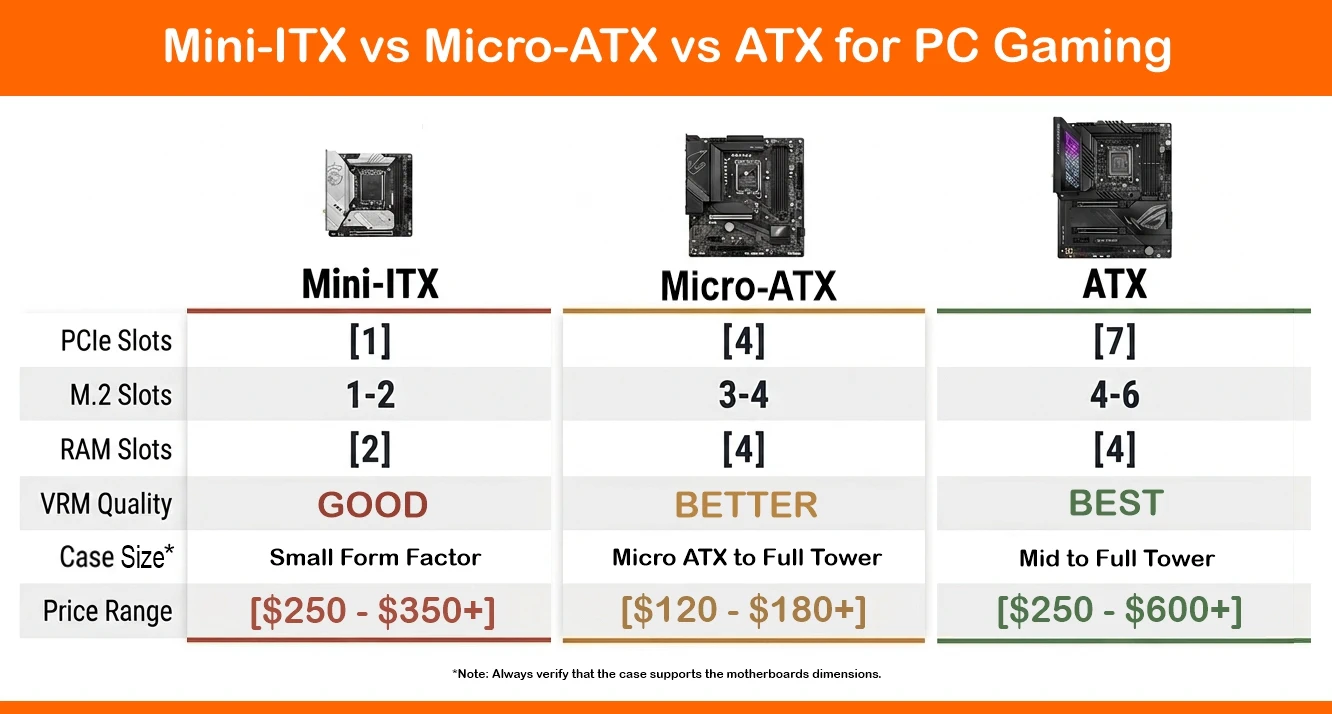
Overall, an ATX motherboard is the best choice for a gaming PC. However, the best motherboard depends on your gaming needs and budget. ATX offers the most PCIe slots, M.2 storage, and VRM headroom for high-TDP CPUs like the Intel Core Ultra 9 285K. Micro-ATX hits the performance-per-dollar sweet spot for mid-range builds. Whereas Mini-ITX is best for compact builds where a small footprint is preferred over the ability to expand or upgrade.
The motherboard is the core component of your build, so research twice and build once. Otherwise, you could make an expensive mistake before you even get started. The motherboard you choose determines your CPU platform, memory type, onboard storage options, PCIe lane allocation, and future upgrade options. Get it wrong, and you’re looking at a full rebuild rather than just swapping out a component or two.
Today, the selection of PC motherboards makes choosing the best option even more difficult. High-core-count processors like AMD’s Ryzen 9 9950X and Intel’s Core Ultra 9 285K require robust VRM configurations to handle the peak draw of these high-end CPUs (especially if you plan to overclock them). PCIe 5.0 SSDs require better thermal dissipation than previous generations. And GPU designs can easily eat up three or four slots, so your motherboard’s layout is a big consideration for your build.
Top this all off by deciding which form factor is best for your build: ATX, Micro-ATX, or Mini-ITX? Each targets different needs for different types of builders.
Let’s break down what sets them apart, recommend the top-performing boards in each category, and help with making the right choice based on your specific build needs.
What to Check Before You Buy a Motherboard
Before jumping in, consider the following to prevent issues during your build.
- Confirm CPU platform compatibility: ATX boards dominate the X870E and Z890-supported chipsets, while mid-range B850 and B760 chipsets are spread across ATX, Micro-ATX, and Mini-ITX form factors.
- Match the VRM to your CPU’s TDP: CPUs operating above 125W under sustained load need ATX boards with robust multi-phase VRM designs. Don’t be forced to undervolting a 170W processor on a budget Micro-ATX board, as this will limit performance.
- Count your M.2 and PCIe slots: If you plan to run multiple NVMe SSDs or add an expansion card, ATX is the only reliable option. Micro-ATX typically offers three to four M.2 slots; Mini-ITX tops out at two.
- Check case clearance before purchasing: Form factor locks in case compatibility. Mini-ITX and small-form-factor (SFF) cases have strict limits on cooler height and GPU length. Always verify clearances before buying either the board or the case.
- Determine your upgrade ceiling: A Micro-ATX board purchased today may lack the PCIe slots for a future GPU upgrade. Consider this now if you plan to upgrade in the future.
Quick Tip: Often it’s better to just repurpose an older PC than try to upgrade it.
Mini-ITX, Micro-ATX, and ATX Motherboard Recommendations
| Form Factor | Top Pick | Best For | Price Range |
| Mini-ITX | MSI MPG X870I EDGE TI EVO WIFI | Compact AMD enthusiast builds | $340–$400 |
| Mini-ITX | ASUS ROG Strix B760-I Gaming WiFi | Compact Intel gaming builds | $240–$360 |
| Micro-ATX | GIGABYTE B850M Aorus Elite | Mid-range AMD gaming builds, value-focused | $150–$180 |
| Micro-ATX | MSI PRO B760M-P | Intel Core i5/i7 budget-to-mid builds | $100–$120 |
| ATX | ASUS ROG Maximus Z890 Hero | High-end Intel builds, overclocking enthusiasts | $450–$600 |
| ATX | MSI MAG X870E Tomahawk WiFi | AMD Ryzen 9000 mainstream-to-enthusiast builds | $250–$320 |
Note: Prices reflect an approximation of current street pricing at the time of writing. And with today’s volatile component prices, it’s always a good idea to shop around.
Motherboard Reviews: Our Top Picks by Form Factor
From Mini-ITX to Standard ATX, these are a few of our top recommendations based on user feedback and personal experience. This isn’t to say any other motherboard isn’t up to the task; it’s just our recommendations for the top picks based on reviews and personal experience.
You may also have noticed that we have some last-gen boards in our list. We include these because even last-gen tech remains relevant today, especially given the inflated costs of RAM and Data Storage devices.
Top Rated ATX Motherboards
ASUS ROG Maximus Z890 Hero
Why It Made the List
The ASUS ROG Maximus Z890 Hero is the benchmark ATX board for Intel LGA1851 platform builders who want zero compromises. Its 20+1 phase VRM design handles the Core Ultra 9 285K under full Cinebench and gaming loads without throttling—a key differentiator at this price point. Five M.2 slots, PCIe 5.0 x16 GPU bandwidth, and Thunderbolt 4 headers justify the premium price.
Technical Specifications
- Form Factor: ATX (305 × 244mm)
- Socket: LGA1851 (Intel Core Ultra 200 series)
- Chipset: Z890
- VRM: 20+1 phase
- RAM Slots: 4× DDR5 (up to 192GB, up to DDR5-9000+ OC)
- PCIe Slots: 1× PCIe 5.0 x16, 1× PCIe 4.0 x16 (x4 electrical), 1× PCIe 4.0 x1
- M.2 Slots: 6× (3× PCIe 5.0 x4 & 3x PCIe 4.0 x4)
- Connectivity: WiFi 7, 2.5G LAN, Thunderbolt 5
- USB: USB 3.2 Gen 2×2 (20Gbps), USB4 40Gbps rear I/O
Pros:
- Exceptional VRM for sustained overclocking
- Dual PCIe 5.0 M.2 slots with thermal shielding
- Thunderbolt 4 and WiFi 7 onboard
- Best-in-class memory overclocking support
Cons:
- High price point ($450–$600)
- Overkill for budget or mid-range CPUs
- Requires full-tower or large mid-tower case
Best For: Intel Core Ultra 9 285K builds, competitive overclockers, content creators who also game.
What to Know: The Maximus Z890 Hero ships with ASUS’s BIOS FlashBack feature, allowing you to update firmware without a CPU or RAM installed—particularly useful for day-one CPU launches.
MSI MAG X870E Tomahawk WiFi
Why It Made the List
I use this MSI MAG X870E Tomahawk WiFi in one of my builds, and it’s rock solid! It consistently ranks at the top of value-per-performance rankings for AMD AM5 ATX boards. The 14+2+1 phase VRM is tuned for Ryzen 9 9950X and Ryzen 7 9700X performance without the price premium of flagship ASUS or GIGABYTE options. Four M.2 slots—two of which support PCIe 5.0—and onboard WiFi 7 are exceptional features for this motherboard at this price.
Technical Specifications
- Form Factor: ATX (305 × 244mm)
- Socket: AM5 (AMD Ryzen 7000/9000 series)
- Chipset: X870E
- VRM: 14+2+1 phase
- RAM Slots: 4× DDR5 (up to 256GB, up to DDR5-8000+ OC)
- PCIe Slots: 1× PCIe 5.0 x16 (GPU), 1× PCIe 4.0 x4, 1× PCIe 3.0 x1
- M.2 Slots: 4× (2× PCIe 5.0 x4, 2× PCIe 4.0 x4)
- Connectivity: Wi-Fi 7, 2.5G LAN
- USB: USB 3.2 Gen 2×2, USB4 40Gbps
Pros:
- Excellent value at its price tier
- Dual PCIe 5.0 M.2 NVMe support
- WiFi 7 and USB4 included
- Strong AM5 platform longevity
Cons:
- No Thunderbolt 5
- VRM falls short of top-tier for sustained 9950X overclocking
- Aesthetic may not appeal to RGB-focused builds
Best For: AMD Ryzen 9 9950X and Ryzen 7 9700X gamers looking for enthusiast features without flagship pricing.
What to Know: X870E chipset boards support simultaneous PCIe 5.0 bandwidth to both the GPU and primary M.2 SSD—an advantage over B850 boards, which typically allocate PCIe 5.0 lanes to storage only.
Top Rated Micro-ATX Motherboards
GIGABYTE B850M Aorus Elite
Why It Made the List
The GIGABYTE B850M Aorus Elite demonstrates exactly why Micro-ATX has closed the gap on ATX for gaming. Packed into a 244 × 244mm board, GIGABYTE has fitted four M.2 slots (including two PCIe 5.0), a 16+2+2-phase VRM capable of comfortably handling up to a Ryzen 7 9700X, and onboard WiFi 7. You used to have to go with a full-size ATX to get these features.
Technical Specifications
- Form Factor: Micro-ATX (244 × 244mm)
- Socket: AM5 (AMD Ryzen 7000/9000 series)
- Chipset: B850
- VRM: 16+2+2 phase
- RAM Slots: 4× DDR5 (up to 192GB, up to DDR5-7600+ OC)
- PCIe Slots: 1× PCIe 5.0 x16, 1× PCIe 3.0 x1
- M.2 Slots: 4× (2× PCIe 5.0 x4, 2× PCIe 4.0 x4)
- Connectivity: Wi-Fi 7, 2.5G LAN
- USB: USB 3.2 Gen 2, USB-C rear I/O
Pros:
- Four M.2 slots in a Micro-ATX form factor
- PCIe 5.0 GPU and M.2 support
- WiFi 7 at a competitive price
- Fits both mid-tower and Micro-ATX cases
Cons:
- VRM not suited for Ryzen 9 9950X at stock speeds
- Only two PCIe expansion slots total
- Less VRM headroom than ATX equivalents
Best For: Budget-conscious AMD Ryzen 5 9600X and Ryzen 7 9700X gaming builds where compact sizing is an advantage.
What to Know: B850 chipset boards officially support AMD EXPO DDR5 memory profiles, making it straightforward to hit DDR5-6000 with compatible kits—the frequency sweet spot for Ryzen 9000 series performance.
MSI PRO B760M-P
Why It Made the List
For budget-conscious builders looking to reuse older DDR4 memory or squeeze the most value out of an Intel 12th, 13th, or 14th-Gen build, the MSI PRO B760M-P delivers rock-solid basics at an entry-level price (around $100). Dropping the cost-adding features like WiFi and DDR5 support, it offers dual PCIe 4.0 M.2 slots, respectable VRM cooling for its tier, and a reliable micro-ATX layout for standard office or budget gaming rigs.
Technical Specifications
- Form Factor: Micro-ATX (244 × 244 mm)
- Socket: LGA1700 (Intel 12th/13th/14th Gen)
- Chipset: B760
- VRM: 10+1+1 phase power design
- RAM Slots: 4× DDR4 (up to 128GB, supports up to 4800+ MHz OC)
- PCIe Slots: 1× PCIe 4.0 x16, 2× PCIe 4.0 x1
- M.2 Slots: 2× PCIe 4.0 x4
- Connectivity: Gigabit LAN (Realtek RTL8111H), No Onboard WiFi
- USB: USB 3.2 Gen 2 Type-C (Rear), USB 3.2 Gen 1, and USB 2.0 ports
Pros:
- Exceptional value for ultra-budget Intel configurations
- Dual PCIe 4.0 M.2 slots (with an included M.2 Shield Frozr heatsink for the primary slot)
- Retains DDR4 support to lower overall platform upgrade costs
- Clean, utilitarian micro-ATX build profile
Cons:
- No integrated WiFi or Bluetooth (requires a separate PCIe card or USB adapter)
- Older Gigabit Ethernet instead of 2.5G LAN
- Limited high-speed USB ports on the rear I/O
- Basic Realtek ALC897 audio codec
Best For: Budget-constrained gaming or everyday desktop builds using an Intel Core i3 or i5 (such as the 12400F or 13400F) where keeping costs low and reusing DDR4 RAM are priorities.
What to Know: This board completely omits wireless networking out of the box, so you will need a wired Ethernet connection or a separate wireless expansion card if you use WiFi. Like most B760 boards, it doesn’t support CPU multiplier overclocking, and its power delivery is best tailored to 65W–125W processors rather than power-hungry Core i7 or i9 chips.
Top Rated Mini-ITX Motherboards
MSI MPG X870I EDGE TI EVO WIFI
Why It Made the List
MSI stands out in the compact build space with the MPG X870I EDGE TI EVO WIFI by solving one of Mini-ITX’s biggest pain points: storage limits. Thanks to an innovative 5-in-1 Xpander daughtercard, it packs a rare triple M.2 slot setup into a standard 170 × 170mm layout. Wrapped in a striking silver-and-white aesthetic, it features a heavy-duty 8+2+1-phase VRM with 110A power stages, 5G LAN, WiFi 7, and dual USB4 40 Gbps ports. For white-themed SFF enthusiast builds demanding extreme memory overclocking (supporting DDR5-10000+) and maximum storage density, it’s a top-tier contender.
Technical Specifications
- Form Factor: Mini-ITX (170 × 170 mm)
- Socket: AM5 (AMD Ryzen 7000/8000/9000 series)
- Chipset: AMD X870
- VRM: 8+2+1 phase (110A Smart Power Stage)
- RAM Slots: 2× DDR5 (up to 128GB, up to DDR5-10000+ OC)
- PCIe Slots: 1× PCIe 5.0 x16
- M.2 Slots: 3× M.2 (1× PCIe 5.0 x4, 2× PCIe 4.0 x4 — 1 via 5-in-1 Xpander Card)
- Connectivity: WiFi 7, Realtek 5G LAN
- USB: 2× USB4 40Gbps (Type-C), 1× USB 3.2 Gen 2×2 20Gbps (via Xpander Card), 6× USB 3.2 Gen 2 10Gbps
Pros:
- Rare 3× M.2 storage design on a Mini-ITX board
- Distinctive silver/white theme perfect for light-colored SFF builds
- High-speed networking with 5G LAN and WiFi 7
- Dual USB4 (40Gbps) with Type-C display support and extreme RAM OC limits (DDR5-10000+)
- Robust power delivery (8+2+1 with 110A SPS) handling flagship Ryzen 9 CPUs
Cons:
- Premium pricing compared to standard B650/X870 ITX options
- 5-in-1 Xpander daughtercard increases vertical clearance requirements around headers
- Only 5 rear USB Type-A ports
- Active VRM cooling solution can run warm under prolonged heavy power draws
Best For:
High-end, white/silver-themed AMD Ryzen 7 and Ryzen 9 builds in SFF cases where up to 3 M.2 NVMe drives and ultra-fast networking (5G/WiFi 7) are non-negotiable.
What to Know:
The third M.2 slot, SATA connectors, and additional front-panel headers reside on the removable 5-in-1 Xpander daughterboard. Check your CPU cooler and cable routing clearances carefully so the daughtercard doesn’t collide with low-profile air coolers or tight SFF chassis layouts.
ASUS ROG Strix B760-I Gaming WiFi
Why It Made the List
The ASUS ROG Strix B760-I Gaming WiFi remains the go-to compact Intel board for builders prioritizing aesthetics alongside performance. Dual M.2 slots, integrated WiFi 6E, and ROG’s well-regarded BIOS interface give this board a strong feature-to-size ratio for Core i5 and Core i7 builds.
Its accessible pricing relative to other Mini-ITX boards makes it a realistic option for compact gaming builds on a budget.
Technical Specifications
- Form Factor: Mini-ITX (170 × 170 mm)
- Socket: LGA1700 (Intel 12th/13th/14th gen)
- Chipset: B760
- VRM: 8+1 phase
- RAM Slots: 2× DDR5 (up to 64GB)
- PCIe Slots: 1× PCIe 5.0 x16
- M.2 Slots: 2× (2× PCIe 4.0 x4)
- Connectivity: Wi-Fi 6E, 2.5G LAN
- USB: USB 3.2 Gen 2, USB-C
Pros:
- Competitive pricing for Mini-ITX
- ROG BIOS is one of the most user-friendly available
- Strong ASUS ecosystem software support
- Clean aesthetic suits compact premium builds
Cons:
- No PCIe 5.0 M.2 support
- Wi-Fi 6E rather than Wi-Fi 7
- Limited to 96GB RAM total
- No CPU overclocking on B760 chipset
Best For: Intel Core i5 13600K and Core i7 13700K compact gaming builds where case aesthetics and build simplicity are priorities.
What to Know: ASUS ROG Strix B760-I is compatible with PCIe 5.0 GPU cards via its x16 slot, even though its M.2 support tops out at PCIe 4.0. Future GPU upgrades are not limited by the board’s storage spec.
How We Choose Our Recommendations
We base our product recommendations in this guide on these four considerations relevant to gaming PC builds.
Motherboard Size and Case Compatibility
Form factor selection depends heavily on case size. ATX boards (305 × 244mm) require mid-tower or full-tower cases, which offer the most airflow and AIO radiator support. A true ATX case will support radiators and GPUs up to 420mm in length. Always check supported clearance; just because a case is spec’d ATX doesn’t mean it will fit components typically used for an ATX build.
Micro-ATX (244 × 244mm) fits both dedicated Micro-ATX cases and standard mid-towers, offering the most case compatibility of the three formats.
Note: you could use a full tower with a Micro-ATX board, but it would look lost inside this large of a case.
Mini-ITX (170 × 170mm) is best used in Small-Form-Factor (SFF) cases, which typically impose strict GPU length limits and maximum cooler heights.
Performance Ceiling
VRM quality (clean power) and the number of PCIe lanes available determine how much CPU and storage performance a motherboard supports. Boards recommended in this guide were evaluated based on supported specifications and real-world user feedback. Of course, ATX motherboards have the advantage for CPUs with TDPs above 125W, meaning that ATX motherboards are the preferred choice of most PC gamers. For chips at 65W to 105W, both Micro-ATX and Mini-ITX boards meet the needs of many who prefer a small-form-factor PC.
Upgradability
AMD’s AM5 platform is available across X870E, B850, and A620 chipsets spanning all three form factors, with Intel’s LGA1851 following similar chipset support. Higher-tier chipsets such as X870E and Z890 are the primary choice for a high-end ATX board by offering more PCIe 5.0 lanes, more M.2 slots, and better overclocking headroom.
If you’re planning to upgrade your GPU or add PCIe storage within the next two to three years, ATX is the more future-proof choice.
Price for Value
Budget range across the recommended boards:
- ATX: $250–$600+, depending on chipset and features
- Micro-ATX: $120 – $180+
- Mini-ITX: $250–$350+
The Micro-ATX tier delivers the most features per dollar for mainstream gaming builds. ATX pricing is justified only when expansion slots, VRM headroom, or high-end chipset features are genuinely needed.
Quick Tip: Pricing can swing wildly, so always shop around to find the best price.
Which Motherboard Form Factor Should You Buy?
First, ask yourself why you’re building a new PC, what games you want to play and what budget you can afford.
Choose ATX if your CPU has a TDP above 125W, you plan to install multiple PCIe devices, or you need more than two M.2 NVMe slots for storage.
An ATX motherboard with a Z890 or X870E chipset provides full overclocking and the latest PCIe 5.0 support. If you’re building an AMD system, the MSI MAG X870E Tomahawk WiFi is a strong value-to-performance motherboard. For Intel builds, the ASUS ROG Maximus Z890 Hero is the benchmark when budget is not an issue.
Choose Micro-ATX if you want a capable gaming system at a lower cost without sacrificing meaningful performance. The GIGABYTE B850M Aorus Elite is a good fit for AMD mid-range builds. Plus, many Micro-ATX motherboards now support WiFi 7 and PCIe 5.0 M.2, features once found only in full-sized ATX.
Choose Mini-ITX if you’re looking for a small, portable option and don’t need glass side panels or ARGB everywhere. Compact builds using a 65W-105W TDP CPU are entirely doable on Mini-ITX. The MSI MPG X870I EDGE TI EVO WIFI is an excellent (and expensive) option but worth it if within your budget.
Just plan on taking extra measures to make sure you have a proper cooling solution if building in a small form factor (SFF) case.
Frequently Asked Questions
What is the difference between ATX, Micro-ATX, and Mini-ITX motherboards for gaming?
ATX (305 × 244mm) offers the most PCIe slots, M.2 NVMe slots, and VRM capacity—making it the best choice for high-TDP CPUs and multi-device builds. Micro-ATX (244 × 244mm) is smaller but retains most ATX features at a lower price. Mini-ITX (170 × 170mm) is the most compact option, limited to two RAM slots and one PCIe x16 slot, suited for SFF builds where size is the priority.
Is Micro-ATX good enough for high-end gaming?
Yes, Micro-ATX motherboards are a good Gaming PC option. Brands like GIGABYTE and MSI offer PCIe 5.0 GPU support, up to four M.2 slots, and WiFi 7 integration. The main limitations are VRM capacity for CPUs with TDPs above 125W and fewer total expansion slots than ATX.
Can a Mini-ITX board handle a Ryzen 9 or Core i9 processor?
Technically yes, but with exceptions. CPUs like the Intel Core Ultra 9 285K (170W TDP) in a Mini-ITX build require aggressive thermal planning, including a case with proper airflow and a compatible cooler within height clearance limits. For most Mini-ITX builders, a 65W to 105W TDP CPU is the practical performance limit without custom cooling solutions.
What chipset should I choose for an AMD gaming build?
X870E is the top-tier AMD chipset, offering simultaneous PCIe 5.0 access to GPU and storage, full CPU overclocking support, and the most USB and M.2 slots. B850 is the mainstream alternative, supporting PCIe 5.0 for storage and AMD EXPO DDR5 profiles at a significantly lower price.
Does form factor directly affect gaming performance?
Form factor does not directly affect in-game frame rates when CPU, GPU, and RAM configurations are identical. The indirect impact comes from VRM quality: a weaker VRM on a small-form-factor board can throttle a high-TDP CPU under sustained load, reducing performance for long gaming sessions. Matching VRM capability to CPU TDP is more important than form factor alone.
Are Mini-ITX motherboards more expensive than ATX motherboards?
Generally, yes. Mini-ITX boards can cost more than Micro-ATX equivalents at the same chipset tier because of the engineering complexity required to fit equivalent features into a smaller PCB. Entry Mini-ITX boards start around $250, with enthusiast models reaching $350+.