
I still remember my “shrink ray” downsizing phase back in 2014. Back then, I tried packing Titan-class performance into a shoebox-sized case that would fit in the fan-cooled storage space I built into my desk.
I started with a premium Mini-ITX board, scraped my knuckles routing cables through impossibly tight gaps, and felt like a genius—until I tried to upgrade the GPU a few years later. It was not happening! I had no room left, so I had to rebuild the entire PC from scratch.
This is why PC gamers prefer ATX motherboards, whether they’re buying a pre-built or building their own gaming rig. Bigger is better for gaming!
You’ve probably felt that temptation to do a small build, too. Some PC builders still love a compact PC that looks great on their desk. But if you talk to the veterans like me who have been building custom PCs since the days of beige boxes and IDE cables, you’ll see a pattern.
We almost always reach for that ATX Motherboard.
After two decades of form-factor changes, the standard ATX motherboard remains the preferred choice for SIs and DIYers.
Key Takeaways:
If you are deciding on which motherboard form factor to go with for your next build, here’s the cheat sheet:
- Thermal Headroom: ATX boards handle the heat of modern, high-wattage CPUs better due to increased surface area and component spacing.
- The GPU Reality: Modern GPUs are massive. ATX ensures your graphics card doesn’t block every other useful port on your system.
- Maintenance Ease: The extra space makes building, cleaning, and upgrading significantly less frustrating.
- Expansion Economics: You get more M.2 slots and PCIe slots per dollar with ATX than any other form factor.
- Future Proofing: Empty slots and extra space today mean you don’t have to buy a new motherboard tomorrow as your needs change.
The “ATX Motherboard” Sweet Spot
When you look at a motherboard spec sheet, you’ll see dimensions like: 305 × 244 mm. What most people miss here is that those dimensions aren’t just about fitting in a case; they are about engineered breathing room.
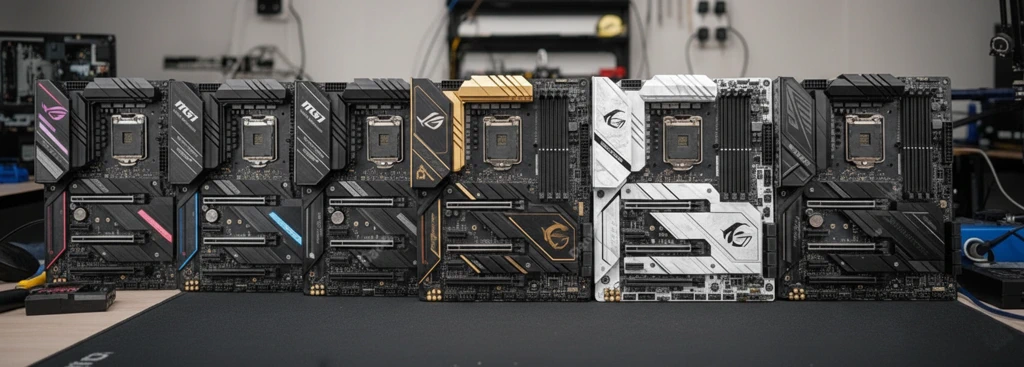
In my experience, “density” is the enemy of longevity. When manufacturers design smaller boards, such as Micro-ATX (mATX) or Mini-ITX, they are forced to cram components into a smaller form factor.
The CPU socket sits uncomfortably close to the RAM slots, and the VRM heatsinks encroach on the air cooler, which can limit your component choices.
Motherboard Thermals Matter!
An ATX motherboard has a physical surface area for better heat dissipation. This benefit matters more today because we are seeing a significant shift in power density across components.
In my early PC building days, heat was never an issue. However, this is less true today as modern CPUs from Intel and AMD are pushing thermal limits we haven’t seen in years.
And… don’t even get me started on those 12VHPWR power connectors melting on Nvidia’s high-end GPUs!
Look at it this way. You decide to build a high-performance gaming rig and cram an i9-14900K or a Ryzen 9 9950X onto a smaller board. Things are going to overheat.
Granted, it’s possible to build a small gaming rig, but extra care needs to be made to allow for proper airflow, as cooling will be a challenge!
Now, an ATX board acts as a larger thermal sink. It handles heat stress better solely because of its size, and you’ll have more room to play around with the fan positions and airflow.
Also, with an ATX motherboard, you don’t have to worry about your NVMe drive throttling just because it’s sitting 3 millimeters away from another blazing-hot component.
The “Fat GPU” Problem
Let’s talk about what almost every PC enthusiast knows: the sheer size of modern graphics cards has been increasing with each generation. If I put my RTX 3080 next to today’s RTX 5080, the size difference is very noticeable.
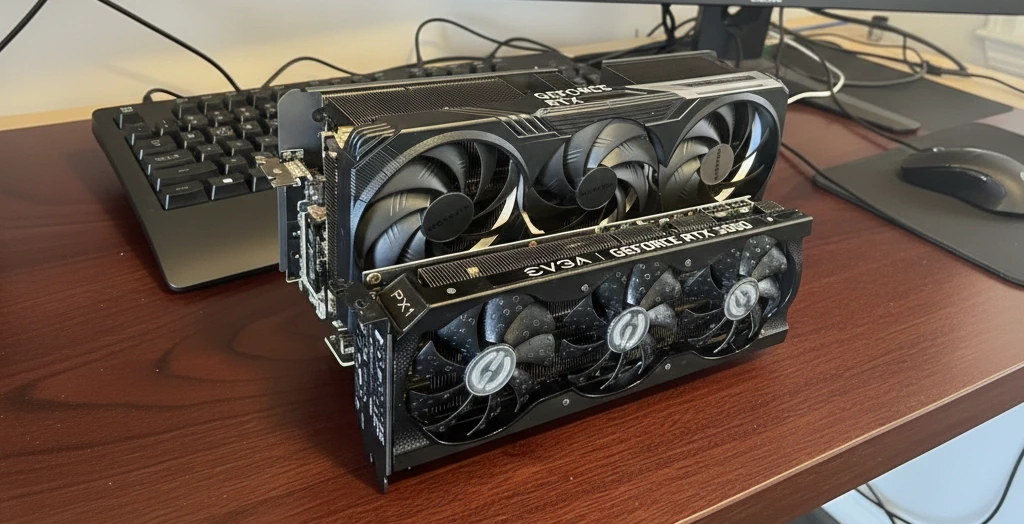
For many, building a new rig comes down to millimeters of available space.
We used to worry about whether dual-slot cards would fit. Now? High-end GPUs are commonly 3.5 to 4 slots thick. This is where the ATX motherboard layout saves you time, plus the skin on your knuckles.
On a Micro-ATX board, a 4-slot GPU effectively swallows the bottom half of your motherboard. It covers your extra PCIe slots, blocks your SATA ports, and sometimes even gets in the way of your front-panel headers. I’ve seen builders buy mATX to save $30, only to realize they can’t plug in their USB headers because the graphics card is sitting on top of them.
With a standard ATX motherboard layout, the spacing is just there! You typically get 4 to 7 expansion slots, so even if your GPU eats the top four, you still have access to the bottom slots for a sound card, a capture card, or a 10GbE network adapter. Plus, you don’t have to pull your GPU every time you want to add an expansion card.
Some Manufacturers offer Small Form Factor (SFF) GPUs. These take up fewer slots but can be just as long as a standard GPU.
Been There, Done That: Learning from Mistakes
This practical experience doesn’t appear in any how-to tutorial, but it matters if you want to minimize the “f-bombs” during your build.
The fact is, building on an ATX motherboard is simply easier!
If you’re like me and 20+ years into this hobby, you lose patience for those “fiddly” builds. You want headers that are easy to reach. You want fan connectors located at the edges of the board, not hidden behind a heatsink in the middle.
The “Knuckle Factor”
It will happen… that case will bite you at some point during your build! Facts aside, in my experience, ATX boards are designed with human hands in mind. Including my sausage fingers! 🙂
- Cable Routing: You have space around the CPU socket to actually plug in the EPS power cables without slicing your fingers on a sharp heatsink fin.
- RAM Clearance: You rarely need to remove your graphics card to replace a RAM stick (a common annoyance on cramped mATX layouts).
- Troubleshooting: When things go wrong—and they will—an ATX board usually has room for diagnostic LEDs and onboard power buttons that aren’t obscured by cabling.
Critics of ATX often overlook that the build process is just the beginning. Maintenance is forever. Cleaning dust, reseating cables, or adding storage is a five-minute job on an ATX rig, but on a small-form-factor build, it’s often a 30-minute teardown, if you’re lucky.
The Best “Bang-for-the-Buck” Motherboard
PC hardware has a strange economic curve. You pay a premium for “very big” (E-ATX), and you pay a “miniaturization tax” for “very small” (Mini-ITX).
Standard ATX motherboards sit in the sweet spot for most PC builds. Because it’s the standard, manufacturers produce more of them, and builders buy them over all other form factors because they offer the best feature-to-price ratio.
This means you generally get better VRMs (Voltage Regulator Modules), better rear I/O connectivity, and more M.2 slots for the same price compared to a lower-spec mATX board.
The Benefit of On-Board M.2 Expansion
We have moved away from SATA SSDs to NVMe M.2 drives. A good ATX board now comes with three, four, or even five M.2 slots. Smaller boards simply don’t have the PCB real estate to lay that many drives flat.
However, some have resorted to stacking them or putting them on the back of the motherboard (where they cook without airflow).
Expansion cards can add M.2 storage, but they only increase your build costs.
If you are a data hoarder or a video editor, ATX is the only logical choice.
The ability to buy up to 8TB of storage on a component the size of a stick of chewing gum was a huge leap forward in PC tech!
Frequently Asked Questions
Does using a larger ATX motherboard require a specific type of power supply?
While ATX motherboards use standard power connectors, the size of your case (and power needs), not the motherboard, will determine your PSU choice. Most ATX builds use standard ATX power supplies, but if you choose a smaller “Small Form Factor” (SFF) case for a compact build, you would likely need an SFX power supply, which often comes with shorter cables that might not reach the headers on a full-sized board.
Can a Micro-ATX or Mini-ITX motherboard fit inside a standard ATX mid-tower case?
Yes. Most standard ATX cases are “backward compatible.” They feature pre-drilled holes and movable standoffs, allowing you to mount smaller boards such as Micro-ATX or Mini-ITX. However, doing this often leaves a lot of empty space at the bottom of the case and can make cable routing look a bit messy since the grommets are positioned for wider boards.
Does the physical size of the motherboard affect gaming frame rates (FPS)?
No. A motherboard’s size doesn’t directly impact the speed of your CPU or GPU. However, a smaller board may have weaker VRMs (Voltage Regulator Modules) or restricted airflow, which can lead to thermal throttling. If your components get too hot on a cramped board, they will lower their clock speeds to protect themselves, resulting in a noticeable drop in gaming performance.
Are there any performance benefits to E-ATX (Extended ATX) motherboards for gaming?
For the average gamer, E-ATX offers no performance boost. These “oversized” boards are typically designed for workstations or extreme enthusiasts. They provide extra room for dual-CPU sockets, eight RAM slots, or additional PCIe lanes for added expansion boards. Unless you are doing heavy professional video rendering or extreme overclocking, a standard ATX board is sufficient.
How do I know if my CPU cooler will interfere with the RAM slots on different board sizes?
This is known as “RAM Clearance.” On smaller boards, the RAM slots are physically closer to the CPU. If you plan to use a large air cooler (like a dual-tower heatsink), you should check the cooler’s “clearance height” in millimeters and compare it to the height of your RAM modules. ATX boards offer more breathing room, but very large coolers can still overhang the first two RAM slots on almost any form factor.
The Bottom Line on Motherboard Size
Many builders ask “which motherboard is best for gaming“, and the best choice depends on your preferences and how you game.
Personally, I lean towards that mini build!
Okay, maybe you’re a gamer who needs a portable rig to tote around to a friend’s LAN party, or truly don’t have space for a full-size PC case. In this case, plan carefully.
Or you’re a high-performance PC gamer who needs a system with room to breathe! That extra space inside an ATX case promotes the airflow you need.
Never mind the benefit of having room for your hands to work inside the case. It also gives you the option to add a new component you may not even have considered needing at the time.
Ask yourself this: If you’re building a computer and know you’ll likely upgrade your GPU or RAM, or add storage within the next five years, just stop overthinking it and buy the ATX board. Otherwise, give the smaller-footprint system a chance. I love mine!



All good points. One reason I went with an ATX motherboard is I prefer a full size case to display all the gear inside! Using any motherboard smaller than a ATX in a full tower would be lost in there. Anyone buying a low cost pre-built should be sure to verify what size motherboard comes with it. I bought a pre-built many years ago and it had really small cheap motherboard leaving large open areas inside the case. It’s like that picked from a pile of unsellable parts and slapped it all together. Lesson learned that you do get what you pay for.
Definitely true on the pre-build components. I’ve only bought one prebuilt in my life, and that was during the crypto mining boom when it was impossible to get a high-end GPU! I searched high and low for an SI that actually listed all the parts included in the build, including the specific GPU. Many back then just gave the GPU type (i.e., 3080) but not the make and model.
I’ve tried a Mini-ITX build before to save desk space, but I ended up regretting it during the summer months. The thermal throttling was so bad I had to put an external fan on it just to keep the temps withing reason! I’ll rebuild it one day when I’m ready for a major upgrade.
I also had to do that once, but with one of those mini PC Sticks, you know, one of those mini PCs that plugs directly into an HDMI port. Kinda like an Amazon FireTV Stick.
I’m currently putting together a parts list for my first build. I was looking at a smaller board to save money, but I didn’t even think about the ‘clearance’ issues with the RAM and the CPU cooler. I think I may go with a full sized board and just not worry about it. Your info was helpful to me.
I would have done the same. However, if you know someone or find a list of parts known to fit together and it’s up to your specs, that’s always an option too. Good luck with your build, and I hope you found some affordable memory! 🙂
I actually had a smaller build until the Monster GPU era arrived. I played the NewEgg Shuffle and actually scored a 3070ti back when the Crypto miners and scalpers were grabbing everything. Since I would have had to rebuild in a larger case, I just went ahead and built a new rig using an ATX motherboard.
I would have done the same! Sometimes you can find a good deal on a full-sized ATX. The only time I ever used a smaller motherboard was when I built a dedicated Plex server for all my media. I needed something small and easy to fit into my entertainment center.
I tried building a mini system to use as a PLEX server in my livingroom. It worked but the fan noise was noticeable when it got too hot. Once I realized I didn’t need a dedicated GPU (I didn’t need transcoding) I eventually gave up and bought a used Intel NuC mini PC with an external drive connected for my media. I was able to connected it directly to my TV using some tips I found on Reddit. I wouldn’t say I wasted any time or money and learned a lot along the way. 🙂
Sorry so long in replying! The mini PC solution works. I’ve done it myself to host my personal photos and videos. Today I have a NAS unit hosting all my Plex media. And I’m glad I grabbed that lifetime Plex Pass before their price increase!