For some, the answer is “Yes”. For many others, it’s likely overkill.
I’ve actually been a computer geek since the 90’s and owned a small business where I would purchase, refurbish and resell business systems and computers. Systems like the old Mac Plus, IBM XT and ATs, and a few i286 systems. All dinosaurs by today’s standards!
Occasionally, I would get some cool gear. One time I ended up with some server-grade motherboards but no cases, so… the “I can make it fit” side of me tried to shoehorn one of these motherboards into a consumer case using a Craftsman Rotary Tool (basically a Dremel) to see if I could make it fit!
Why, you ask? Because I wanted the performance and capacity the server board supported, and while it was ugly, it was functional!
Fast-forward to today, and while PC standards have improved, the question remains the same: Does your dream build actually need an Extended ATX (EATX) motherboard, or are you just buying a very expensive motherboard you’ll never fully utilize?
It’s a weird time for the PC industry. We have PCIe 5.0 NVMe drives that can run hotter than a toaster and huge GPUs like the RTX 5090 that practically require a case of their own. Plus, don’t even get me started on storage and RAM costs!
This “bigger is better” mentality is a necessity for those who need the expansion an EATX motherboard provides. Plus, the PCB real estate is needed to keep these high-end workstations from melting.
But for most, it’s overkill unless you find a good deal or have an unlimited budget!
Key Takeaways
- Size Variance: The “EATX” label is inconsistent; always verify the exact dimensions in millimeters to make sure it fits your case and doesn’t block cable routing.
- Thermal Stability: These boards offer superior power delivery (VRMs) and a larger cooling surface area, making them essential for high-heat tasks such as running a local AI LLM or video/animation rendering.
- Superior Expansion: They provide the physical room and PCIe lanes needed for massive GPUs, multiple NVMe SSDs, and high-capacity RAM (up to 8 slots).
- Signal Integrity: The extra PCB space prevents electrical “noise” between high-speed data paths (PCIe 5.0/6.0), ensuring system stability at today’s speeds.
- Complex Installation: Due to their weight and size, they require specialized cases and precise mounting to avoid electrical shorts against the case tray.
- Feature & Capacity Boost: Compared to ATX, EATX significantly scales up hardware limits, offering nearly triple the PCIe lanes (up to 148) and supporting up to 2TB of RAM, whereas standard boards are capped at 256GB.
Reality vs. The Spec Sheet
When you read a spec sheet, EATX looks like a “no-brainer.” More slots, more power, more everything. But do you really need it? Will you actually take advantage of all the extras found with an EATX motherboard?
Here is what decades of experience has taught me:
1. The “EATX” Label is a Marketing Lie
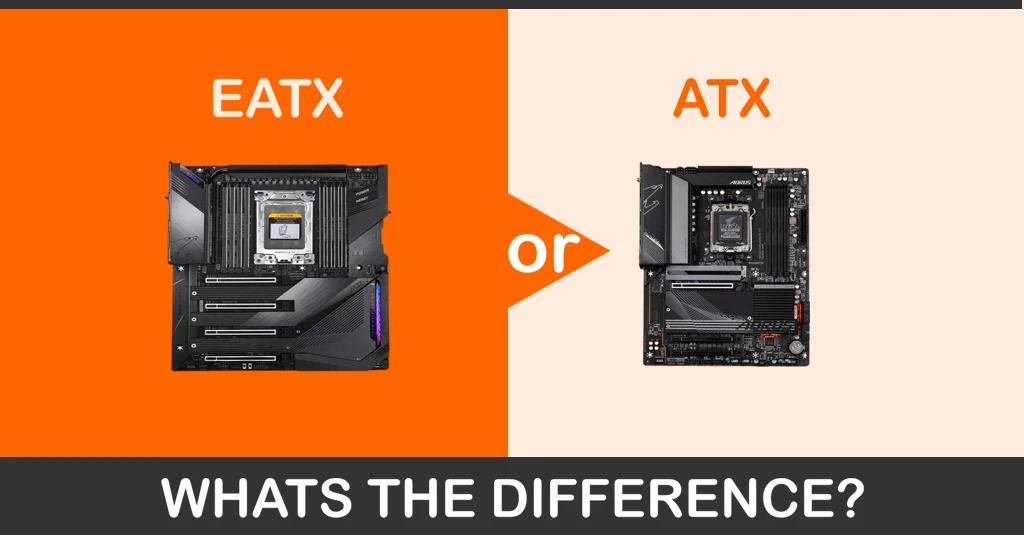
What most people miss is that “EATX” isn’t a strict unified standard like ATX. While a “true” EATX board is 12 x 13 inches (305 x 330 mm), many manufacturers slap the EATX label on boards that are just an inch wider than the ATX standard, 12 x 10.5 inches (305 x 267 mm).
- The Trap: You buy a case rated for “EATX,” but because your specific board is a “true” 13-inch beast, it completely covers your cable grommets or blocks fan and AIO cooling options. I’ve“ seen $5,000 builds ruined visually because the builder had to snake 24-pin cables through the hard drive cages.
2. VRMs: Power Stability for Overclocking and Demanding Tasks
Since GPU SLI officially died in 2020, there is less of a need to buy an EATX motherboard for extra PCIe slots. Many builders buy it for the high-end Voltage Regulator Modules (VRMs).
With modern CPUs capable of drawing 250W–350W+ or more under load, standard boards can get toasty during heavy workloads. EATX boards spread those power phases out.
- The “So What”: If you’re rendering 8K video or running a local AI LLM model for hours, that extra surface area isn’t just “nice to have”—it’s“ the difference between a stable system and one that could thermal-throttle, thereby reducing performance.
3. The Multi-GPU & NVMe Factor
Today’s GPUs are massive! A modern 40 or 50-series card is basically a brick. Even though SLI is dead, you might have a need to install two or more GPUs.
If you actually install two of these enormous GPUs on a standard ATX motherboard, they will likely choke each other’s airflow if they even fit at all! EATX provides spacing between slots to let them breathe.
Also, NVMe M.2 storage needs are a consideration. A standard ATX board will often need to share bandwidth (PCIe lanes) if you have more than one NVMe M.2 drive installed. These lanes are also shared with the motherboard’s SATA ports.
EATX boards often support the PCIe lane capacity (especially on HEDT platforms like Threadripper) to run 4+ M.2 SSDs without any performance compromises.
Tip: If you’re not using any SATA devices, see if you can disable these ports in your system BIOS to free up their reserved PCIe lanes.
4. Installation Attention to Detail
Installing an E-ATX motherboard requires more attention to detail than a standard build.
These boards are larger and heavier, and often include integrated metal backplates, leaving very little room for error during mounting.
It’s important to manually verify that your case standoffs align perfectly with the board’s mounting holes. Any extra or misplaced standoff can press against the backplate, causing a short.
Trust me, it happens. I was building a system once, and while I didn’t fry the motherboard, it simply refused to boot when mounted in the case.
When I took it out of the case and bench-built it, it worked fine. My solution? Electrical tape on the parts of the case I thought might be causing the short.
Why Motherboards Are Getting Bigger
If you’ve noticed that high-end motherboards are growing into “E-ATX” giants, it isn’t just for show. It’s happening because manufacturers are facing the challenge of cramming more “digital traffic” into the same amount of space in high-end motherboards.
1. The “Signal Integrity” Problem
Modern specifications (such as PCIe 5.0 and soon 6.0) move data at incredible speeds. Think of these data paths (PCIe Lanes) like high-speed lanes on a highway. When lanes are too close together, the “noise” from one car interferes with the other.
To keep these PCIe lane signals clean and fast, engineers need more physical room (PCB real estate) to separate the lanes.
2. The CPU “Traffic Jam”
New “Prosumer” processors (chips meant for heavy-duty video editing or AI) now use quad-channel memory. This requirement means there are twice as many RAM slots as usual.
Because all those slots need to connect directly to the CPU, the area around the processor has become the most crowded spot on the motherboard.
On a standard ATX motherboard, there is simply no room left for more than 4 RAM slots.
3. The Battle for Space
Manufacturers like Gigabyte, ASUS and a few others have introduced two solutions:
- The “Back-Plug” Approach: Moving all the messy power cables to the “backside” of the motherboard to save space on the front.
- The “Giant” Approach (E-ATX): Just making the board wider.
Tip: If you do buy a motherboard with the connectors on the backside, be sure your case supports this emerging standard.
ATX vs. EATX: Key Comparisons
| Feature | Standard ATX | EATX (Extended) |
| Dimensions | 12″ x 9.6″ | Up to 12″ x 13″ |
| PCIe Lanes | Typically 48 (with 20 shared) | Typically 148 (with 20 shared) |
| RAM Capacity | Usually 4 slots (up to 256GB) | Often 8 slots (up to 2TB+) |
| Case Requirement | Mid to Full Tower | Full Tower (Recommended) |
| Ideal For | Gaming, General Use | Workstations, Server-grade tasks, Extreme Overclocking (OC) |
| Price Tier | $150 – $600+ | $500 – $1200+ |
Note: If your CPU doesn’t support all those lanes, some EATX boards support rapid data switching to compensate while only introducing a tiny bit of “lag” (latency).
Case Compatibility List: The Safe Bets
If you decide the EATX is the motherboard for you, don’t guess with the case. Always measure twice, build once!
Here are just a few cases I have personally worked with that handle the extra width without compromise:
1. Corsair 9000D RGB Airflow
The Corsair 9000D is the massive successor to the 1000D. If you want a case that literally defines “no limits,” this is it.
- Max Motherboard Supported: SSI-EEB / E-ATX (up to 13″ wide).
- Why it’s Top-Rated: It is one of the only cases on the market that can comfortably house a full SSI-EEB motherboard and a secondary Mini-ITX system simultaneously, with room left over for 480mm radiators.
- E-ATX Support: Massive tray space with native SSI-EEB and oversized E-ATX support.
- Unique Feature: It features the InfiniRail system, which lets you slide fan mounts to clear thick motherboards or VRM heatsinks that often interfere with top-mounted radiators in smaller cases.
2. Fractal Design Meshify 3 XL
The successor to the 2 XL, the Fractal Design Meshify 3 XL is built for high-wattage components with plenty of room to breathe.
- Max Support: SSI-EEB / EE-ATX (up to 13.68″ wide).
- Why it’s top-tier: It solves the “E-ATX overlap” problem by replacing standard grommets with a dedicated Central Cable Trench. This allows you to install the largest 13-inch (330mm) motherboards while keeping your cabling perfectly managed and accessible behind a steel shroud.
- Unique Feature: The Adjust Pro Hub (on select models) offers a hardware-level fan and RGB controller that you can manage via a web browser for performance monitoring.
3. Thermaltake AX500 TG
The Thermaltake AX500 is affordably priced, making it a good fit for high-end workstations or gaming rigs.
- Max Support: SSI-EEB / E-ATX (up to 13″ wide).
- The Advantage: It supports dual 420mm radiators simultaneously, which is rare. Most cases make you choose between a large board or large radiators; this does both.
- Unique Feature: It is fully compatible with “Hidden Connector” motherboards (such as ASUS BTF or MSI Project Zero), which have power plugs on the back of the motherboard, as we mentioned earlier.
Note: These are just a few cases designed to “properly” fit a full 13-inch wide EATX motherboard
Consider “Why” You Want an EATX Motherboard
Most of you reading this might be looking at EATX because it “looks” impressive. It fills the glass side panel of your case (if you have one), making your rig the centerpiece of your desk.
Plus, we often think “bigger” and “more expensive” equals “future-proof.” It’s“ a comforting lie we tell ourselves to justify spending up to $1,200 or more on a motherboard purchase.
But ask yourself this: Do you need all the features of an EATX motherboard?
Buy an EATX if:
- You are building a professional workstation for video editing, 3D rendering, or AI LLMs.
- You plan to use custom water-cooling loops and need the PCB space for pumps and reservoirs.
- You’re building a High-End Desktop (like Threadripper or Xeon) and need more than 256GB RAM or Multiple GPUs.
Skip the EATX if:
- You’re just a gamer. Even a high-end one.
- You’re only building a General Use/Office PC
- You need a compact desk setup.
- You are on a fixed budget.
Some Other Questions You Might Have
Does an E-ATX motherboard require a specific power supply, or will a standard ATX PSU work?
While most E-ATX motherboards use the standard 24-pin power connector, they often require multiple 8-pin EPS (CPU) power connectors to stabilize the high-end VRMs mentioned. Before buying, you should make sure your power supply has enough dedicated cables for these extra ports and enough wattage to handle the “prosumer” components typically paired with these large boards.
Can I install an E-ATX motherboard in a Mid-Tower case if the dimensions seem to fit?
Maybe, but why? Even if a Mid-Tower physically accommodates the width, you will likely encounter clearance issues with front-mounted fans, liquid-cooling radiators, or cable-management grommets. Also, E-ATX boards often have side-exit SATA or USB ports that can be completely blocked by the frame of a smaller case, making them impossible to plug in once the board is mounted.
Do E-ATX motherboards provide better gaming performance or higher FPS?
No. A motherboard is the foundation for your components. As long as there’s space for the component you need, a wider one won’t make them perform any better. However, if you find you’re thermally limited (meaning your current board is overheating and slowing down your CPU), or you are using specialized multi-GPU setups for rendering, a standard ATX board will deliver the same gaming performance as an E-ATX version of the same chipset.
Are there any specialized “server” features on E-ATX boards that are missing from ATX?
Yes, some server-grade E-ATX boards (think AMD Threadripper CPUs) include features like IPMI (Intelligent Platform Management Interface), which allows you to control the computer remotely even if it’s turned off. They also frequently support ECC (Error Correction Code) memory, which is crucial for long-term stability in data science or server hosting. But it is rarely a standard feature found on consumer E-ATX boards.
If I use an E-ATX board, do I need to worry about the weight sagging or damaging the case?
Because E-ATX boards are significantly heavier, often due to massive metal heatsinks and backplates, they can put more stress on the case tray. It is highly recommended to use a case made of thicker steel or reinforced aluminum. Additionally, if you are mounting a 4-slot GPU on an E-ATX board, the combined weight can cause “PCB flex,” making a GPU support bracket almost mandatory to protect the motherboard’s PCIe slots.
Final Thoughts
If you’re not planning to run three or more Gen5 SSDs, more than 256GB of RAM, or a top-tier workstation CPU, the price premium is hard to justify over standard ATX or any of the other motherboard form factors
Otherwise, if money is no object and you want the biggest, baddest rig, then an EATX system is the build for you!