
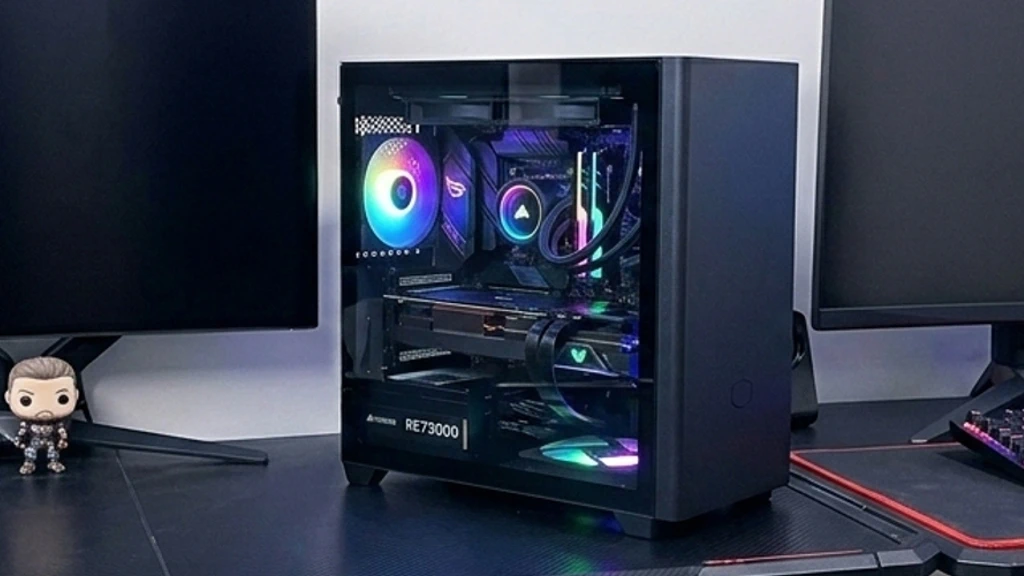
Yes (with some caveats). For most gamers, a Micro ATX (mATX) motherboard will not reduce frame rates or slow down your games. It offers a balance between size, cost, and functionality.
Once you’ve chosen a processor and a graphics card, it’s now time to choose a motherboard. As you’re searching, you see “Micro ATX” listed at a lower price than most standard ATX boards. You ask yourself, “Will a smaller Micro ATX motherboard hurt my gaming performance?” Also, if you’re looking to build a smaller Gaming Rig, the mATX form factor might be the right choice.
Key Takeaways
-
- Performance is identical: Your CPU and GPU determine gaming speed, not the motherboard size.
- Cost savings: Micro ATX boards are often less expensive than full-sized ATX boards.
- Space efficiency: These boards fit in smaller cases, saving desk space.
- Expansion limits: You get fewer PCIe slots, which limits multi-GPU setups or extra add-on cards.
- Cooling: Some care and planning are needed for proper cooling.
Understanding the mATX Form Factor
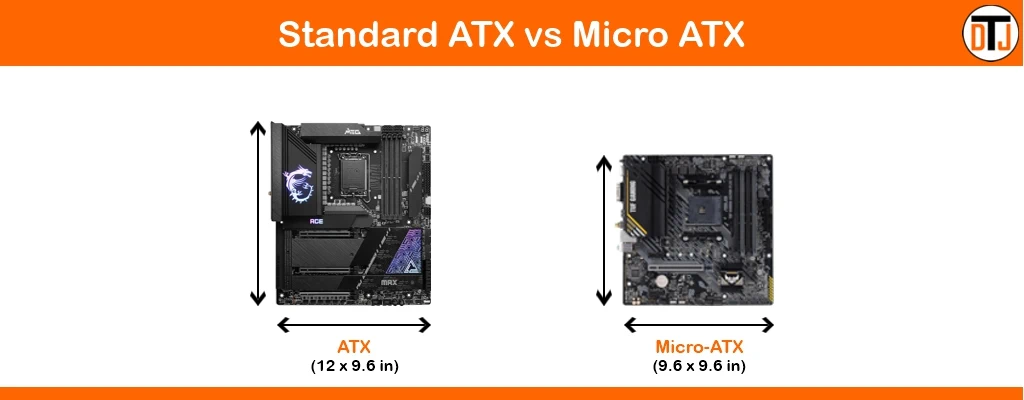
You should understand what “Micro ATX” actually means in terms of physical size. A standard ATX motherboard measures 12 inches by 9.6 inches. A Micro ATX board typically measures 9.6 inches by 9.6 inches.
You lose about 2.4 inches of vertical space at the bottom of the board. Manufacturers remove the bottom expansion slots to achieve this size. This smaller footprint allows the board to fit into smaller, more compact cases.
However, as with larger, more standard motherboards, the component area around the CPU socket and the top graphics card slot is standard.
Gaming Performance and Speed
You might think, as some others do, that a smaller board means lower speed. This is a myth. The motherboard is just where you connect your components. It does not affect gaming performance.
Some will try to argue that the chipsets are less robust. The truth is, a Micro ATX board uses the same chipsets as its full-sized ATX equivalent. For example, a B760 chipset performs the same way on an mATX board as on a standard ATX board.
On both motherboards, the processor runs at the same clock speed. The RAM operates at the same frequency, and your graphics card pushes the same number of pixels.
What does this mean? It means the chipset determines how connected components are supported, not the motherboard size itself.
If you were to build and configure an ATX and mATX system that supports the same chipset and components, you would see no difference in “Call of Duty” or “Cyberpunk 2077” frame rates between the two. The board facilitates communication between the parts you install.
mATX Expansion Slots and Connectivity
The main trade-off of choosing a Micro ATX form factor is limited expansion. You need to first determine your specific needs before buying.
1. PCIe Slots
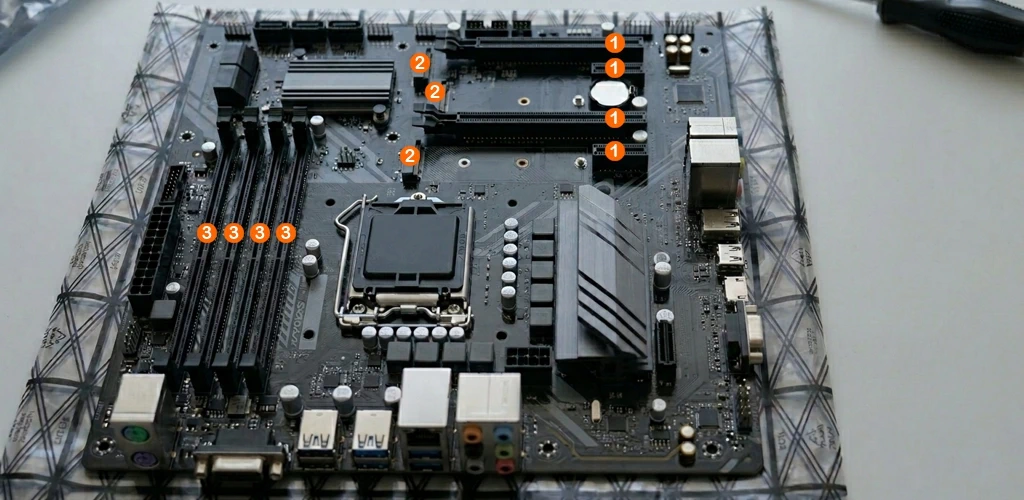
Standard ATX boards usually offer up to seven expansion slots. Micro ATX boards typically offer up to four.
-
- The Gamer’s Reality: Most modern gamers use only one graphics card slot.
- The Limitation: If you plan to use multiple graphics cards, a dedicated sound card, and a video capture card, an mATX board will not work. You will run out of physical room, especially if your GPU is a modern behemoth that takes up 3 or more slots!
2. M.2 Storage
Modern games require fast storage. Micro ATX boards typically include two or three M.2 slots for NVMe SSDs. This allows you to install terabytes of high-speed storage.
While a massive E-ATX board might offer four or five slots, two or three slots should meet the needs of 99% of gamers.
3. RAM Slots
Most mainstream consumer Micro ATX boards feature four RAM slots, matching the standard ATX layout. You can install up to 256GB of memory on most modern mATX boards. However, at today’s prices, you might need to take out a loan! 🙁
RAM costs aside, this is far more than any current game requires. Some budget mATX boards have only two RAM slots, which is fine if you have no intention of adding more RAM.
The Micro ATX Cost Advantage
You can save money by choosing a Micro ATX motherboard. Manufacturers use fewer materials and connectors, simplifying the motherboard layout. This makes them easier and less costly to produce and ship.
With the cost of RAM and storage, it’s a consideration nowadays. You might find a feature-rich mATX board for $150 that matches the specs of a $200 ATX board.
When it comes to the best gaming motherboards, many choose a Micro-ATX board to offset the higher cost of RAM, or reinvest their $50 savings into a better graphics card or a faster processor.
If you don’t need a full-sized motherboard, a Micro-ATX motherboard is a good gaming option.
Case Compatibility and Cooling
Size matters for your physical workspace. A full ATX tower takes up a lot of desk or floor space. A Micro ATX case is shorter and often easier to manage.
PC Case Airflow
You might worry about the heat in a smaller case. However, Micro ATX is not as cramped as Mini-ITX.
-
- Mini-ITX: These tiny boards often suffer from restricted airflow and require specialized cooling.
- Micro ATX: These cases usually retain standard width. This allows you to use large air coolers or 240mm liquid radiators.
By planning your cooling carefully, your components will breathe just fine. You can install standard 120mm or 140mm fans in mATX cases to keep temperatures low.
Who Should Buy Micro ATX?
It all comes down to space, cost and future upgrade needs, especially if you plan to add any PCIe expansion cards in the future.
You should choose Micro ATX if:
-
- You use a single Graphics Card: This covers the vast majority of PC gamers.
- You want to save money: You prefer value over unused features.
- You value desk space: You want a PC that isn’t a massive monolith.
- You want a standard build experience: You avoid the frustration of building in tiny Mini-ITX cases.
You should avoid Micro ATX if:
-
- You need massive expansion: Room for three or more PCIe add-in cards.
- You want extreme aesthetics: Some builders prefer the look of a board that fills the entire case.
- You are an extreme overclocker: The very best power delivery systems (VRMs) are sometimes exclusive to high-end E-ATX boards, though high-quality mATX boards handle moderate overclocking well.
Frequently Asked Questions
Will a Micro ATX motherboard fit into a standard ATX Mid-Tower case?
Yes. Almost all standard Mid-Tower and Full-Tower ATX cases include mounting holes for Micro ATX boards. Because the mATX standard uses the same top mounting points as ATX, you can easily install a smaller board in a larger case, though it will leave a visible gap at the bottom of the chassis.
Does the smaller size of an mATX board affect the VRM (Voltage Regulator Module) quality for high-end CPUs?
While the physical size doesn’t inherently lower quality, mATX boards have less “real estate” for cooling components. If you are using a top-tier, high-wattage processor (like a Core i9 or Ryzen 9), you should look for mATX boards with substantial heatsinks over the VRMs to ensure they don’t thermal throttle under heavy sustained loads.
Can I use a 3-slot or 4-slot “thick” GPU on a Micro ATX board without blocking all other connectors?
It depends on the specific layout of the motherboard. On many mATX boards, the primary PCIe slot is the top-most slot. A massive “4-slot” GPU will hang down and likely cover every other expansion slot on the board, and may even sit dangerously close to the case’s bottom headers (like USB and front-panel connectors).
Are there any differences in the BIOS features or overclocking software between ATX and mATX versions of the same board series?
Generally, no. If a manufacturer releases an “Elite” or “Gaming” version of a board in both sizes using the same chipset, the BIOS interface and software utilities are usually identical. The only differences in the BIOS would be the removal of settings for hardware that isn’t physically present, such as extra PCIe slots or SATA ports.
How does Micro ATX compare to Mini-ITX for a “small form factor” (SFF) build?
Micro ATX is a middle ground. Mini-ITX is significantly smaller and typically has only two RAM slots and one PCIe slot. While Mini-ITX lets you build a small form factor PC, those builds often require non-standard “SFX” power supplies and low-profile coolers, whereas Micro ATX usually allows you to use standard, more affordable ATX power supplies and full-sized CPU coolers.
Final Thoughts on mATX
A Micro ATX motherboard is an excellent foundation for a gaming PC. You sacrifice a few expansion slots that you likely would never use. In exchange, you gain a more compact system and save money.
Gaming performance is often comparable to that of the ATX equivalent. Don’t let the “Micro” name fool you. These motherboards handle heavy gaming loads just fine.



One other thing to consider are VRM heatsinks. Some budget mATX boards cut corners there to keep the price down. If anyone is planning on running an i9 or a Ryzen 9, make sure the board has decent power delivery cooling, otherwise, you might actually see some thermal throttling that you wouldn’t get on a high-end ATX board.
Good Point! While most overclockers go for a full-size ATX motherboard, I have seen some compact high-end gaming rigs where skimping on the VRM would be bad for temps!
I built a small system that easily fits on my desk. My system may not have the most expensive components, but it still handles games I play like Fortnite and of course my basic online stuff. I’ve always build my own computers because I like to choose what parts to use. And I agree that unless you need a gaming system to play games like Cyberpunk and top titles like this, Micro ATX can work just fine for basic gaming.
I have a couple of Gaming Rigs. I mostly play racing and flight sims, so these are full-sized ATX boards running dedicated GPUs. I do have a mini PC I built, connected directly to my TV, that I use for some light gaming. I always build my own PCs, except for one time during the crypto-mining craze when you could only get a new GPU by buying a pre-built.
I built a NAS using a Micro-ATX and even though I had no plans top game on it, I had to put a lot of thought into choosing the parts for my build. The toughest choice was teh CPU cooler. I went with the be quite Pure Rock Low Profile just to be sure it all fit! 🙂
The be quite Pure Rock is a nice choice! I’ve never used it myself, but it looks like it would work with almost any build!